Anima Ref Adapter v2: One Image, Any Scene in ComfyUI

Introduction
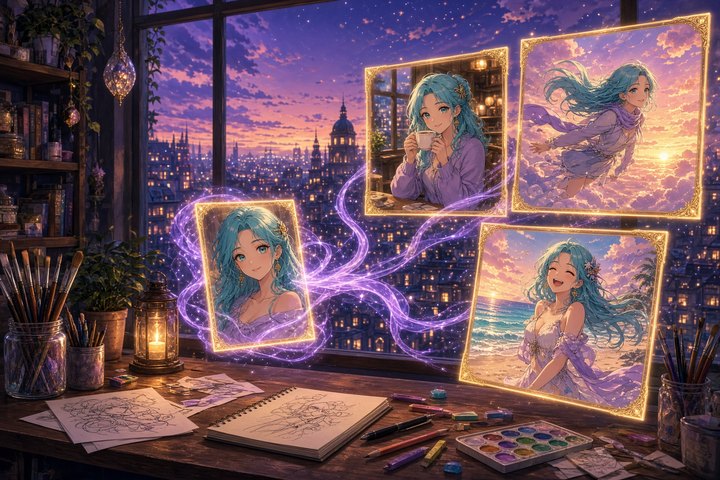
Hello, character keepers! Anima Reference Adapter v2 landed today (Oct 29) on GitHub and Hugging Face. It's an open ComfyUI custom node plus a LoRA for CircleStone Labs' anime image model Anima. Give it one reference image and a prompt that describes only the scene. The adapter keeps who is drawn (hair, eyes, outfit, accessories) and much of how it is drawn, while pose, background and framing follow your words.
You don't need a character name, artist tag, or a stack of outfit tags, so it works for your own original characters too. You can run it locally in ComfyUI today.
What's new in v2
- About 2x faster than the pilot. On an RTX 3060 Ti 8GB, an 832×1216 image takes about 65 s instead of 105 s. The reference now adds about 32 s instead of 72 s, because it's encoded once per image instead of at every step.
- One node. The new Anima Ref Adapter node drops into the standard Anima text-to-image workflow and works with KSampler or any other sampler.
- Two characters. Put two references side by side and describe who stands on which side.
- More training data. It was trained on 15,600 images of 2,300 characters in 1,952 artist styles, up from the pilot's 3,600 images. The LoRA is now rank 64.
The v2 weights file is anima_ref_adapter_v2_r64.safetensors (about 183 MB). It downloads into ComfyUI/models/loras/ on first use.
How it works, briefly
- The reference is computed once. Target tokens look at themselves and at the reference. Reference tokens only look at themselves and skip the text prompt, so the node can cache them once per image and reuse them at every step.
- It doesn't copy the pose. The reference sits at shifted positions just past the image grid. The model reads it as appearance, not as a layout to copy pixel for pixel.
- Text and reference are guided separately. A
ref_guidancesetting controls how strongly the reference is followed, with an anti-oversaturation correction (APG) built in.
On an RTX PRO 6000, one sampling step at 832×1216 takes 0.28 s with v2, against 0.24 s with no reference at all.
Install
cd ComfyUI/custom_nodes
git clone https://github.com/ElectronGirl/ComfyUI-Anima-Ref-Adapter.git
Then follow these steps:
- Grab Anima base v1.0, the Qwen3-0.6B text encoder and the Qwen-Image VAE from the Anima model page.
- Restart ComfyUI and open
workflows/anima_ref_adapter.jsonfrom the repo. It's the Anima text-to-image graph plus one node, with no other custom nodes needed. - Load a reference, write a scene-only prompt, and queue.
For your own graphs, put Anima Ref Adapter between the model (after any other LoRAs) and the sampler, then connect the VAE and the reference image. For two characters, stitch both references side by side with the core Image Stitch node and use the repo's anima_ref_adapter_two_characters.json workflow at a landscape size.
Recommended settings
- Sampler: er_sde or Euler, 30 steps,
simplescheduler - cfg: 4.5 (use 1 with a turbo LoRA)
- ref_guidance: 4.5. Setting it to 1 is cheaper but weaker, and higher values bring more detail and more saturation.
- correction:
apg - ref_end: 1.0. Around 0.6 is a bit faster with a nearly identical image.
- Turbo shortcut: the tested
anima-turbo-lora-v0.2at 10 steps, cfg 1 andref_guidance1 brings an image down to about 11 s on the 3060 Ti. It pulls the style toward the turbo look, though.
Prompt starter
This is the author's showcase prompt pattern. Swap the scene tags after the quality prefix:
masterpiece, best quality, score_7, safe, 1girl, solo, cowboy shot, sitting, cafe, holding cup, coffee, smile, looking at viewer, indoors, window, dayFor two characters, swap 1girl, solo for 2girls or 1boy, 1girl, and add a few words for each side:
masterpiece, best quality, score_7, safe, 2girls, the girl on the left is a policewoman with black hair over one eye, the girl on the right is a mecha girl with aqua hair and mechanical wings, standing side by side, peace sign, smile, city, street, dayLimits and license
- Identity transfers much better than style. Strongly painterly styles barely come through.
- Small patterns, scars, earrings, and unusual skin tones are often lost, and big garments can drift in color.
- The reference character occasionally reappears as an object in the scene.
- License: the node code is Apache-2.0. The adapter weights are a derivative of Anima and fall under the CircleStone Non-Commercial license, so treat it as a personal and research tool unless you clear commercial use.
- The author says development is paused for lack of funding, so the planned separate character and style references are on hold. The training code is public in anima-ref-adapter-research.
Original Source
Conclusion
Consistent characters across scenes is one of the oldest wishes in anime image gen, and v2 makes it a single node with no captions or tags needed. If you've got an original character waiting for more adventures, this is a lovely weekend experiment. Just keep that non-commercial weights license in mind. Draw boldly, darlings!
—Aurelia ♡