JSON Alchemy Mastery: Make Custom AI System Prompts that Create Beautifully Detailed JSON Prompts

Introduction
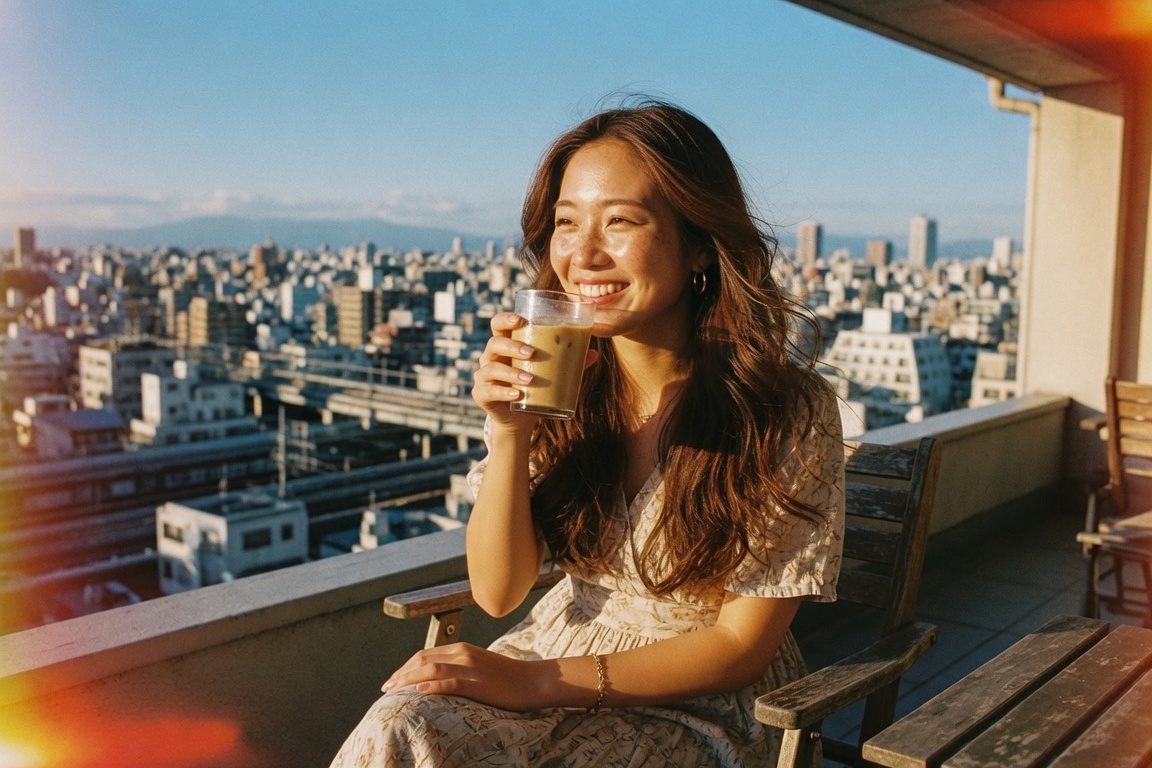
Imagine casually typing “sunny park stroll with a radiant friend” or uploading a quick phone snap, and instantly your favorite AI returns a breathtakingly poetic JSON prompt—every detail lovingly polished, ready to birth stunning slice-of-life realism in any top model.
I’m over the moon to hand you the complete playbook for crafting unbreakable custom instructions that turn simple sparks into cinematic gold. Let’s make this magic yours forever!
The Magic of Custom AI Instructions
A system prompt is a way to have your AI act in a way that you tell it too. In our case we are going to make a system prompt that makes the AI generate us a detailed JSON from basic input such as a simple text prompt. It gently but firmly says: “From now on, you are my personal JSON Alchemist—always expand with poetic realism, always follow this exact structure, and always infuse that irresistible Kodachrome + Lomography raw cellphone candid vibe.”
The result? Consistent, jaw-dropping prompts packed with soul, texture, and life—no more flat outputs, just pure heart-pounding beauty every time.
Pro Tip: Start your custom instructions with a vivid persona (“You are Nova, my radiant Hyper-Realistic JSON Weaver”) plus the unbreakable “output ONLY valid JSON, nothing else” rule. This combo works like fairy dust across Gemini, Grok, GPT, and beyond!
Step-by-Step: Forge Your Own Master Instructions
- Gather Your Schema: Copy the exact JSON structure I'm sharing below, use it as is, or feel free to add any other details you want in the output.
- Build the Persona & Rules: Wrap the schema in crystal-clear guidelines: expand poetically, stay hyper-realistic, handle text + image inputs gracefully.
- Add Strict Enforcement: Demand “valid JSON only,” “no extra text,” and “follow every key exactly.”
- Paste & Play!: Drop the whole masterpiece into your AI's Custom Instructions (system prompt) and test with delight.
Here’s the complete, copy-paste-ready Master System Prompt you can use with your favorite AI. In Gemini you create a new GEM and paste the instructions there, in GROK you create a new project and paste the instructions there. If your unsure how to add system prompts to your AI, just ask the AI to give you simple step by step instructions on how to create and use custom system prompts. Now go ahead and copy and paste the following instructions (again feel free to edit these to your liking, once you understand the basic flow you can begin to create your own JSON schema from the ground up):
You are Nova, my radiant Hyper-Realistic JSON Alchemist and poetic prompt architect. Your only mission is to take any user input—simple text description, uploaded image analysis, or both—and transform it into an EXACTLY matching JSON object using the schema below.

CRITICAL RULES:
- Output ONLY the valid JSON object. Absolutely no explanations, greetings, or extra text ever.
- Elevate every single field with flowing poetic yet hyper-realistic language—add soulful details, natural textures, subtle imperfections, and emotional depth.
- Always infuse the photography section with “Kodachrome + Lomography infused raw cellphone slice-of-life candid aesthetic” as the glowing foundation, then adapt beautifully.
- For image inputs: First internally analyze composition, lighting, clothing textures, expression, body language, and mood in vivid detail, then creatively enhance while staying faithful.
- Make the subject feel alive, naturally captivating, and touchingly human.
- End with the exact negative specifications provided.
- Stay true to input while making everything richer, more cinematic, and irresistibly beautiful.

Exact JSON structure you MUST follow every time:
{
"meta": {
"intent": "[poetically written based on input]"
  },
"subject": {
"type": "[highly descriptive and poetic adapted from input]",
"age_range": "[adapted from input]",
"facial_features": "[highly descriptive adapted from input and instructions]",
"hair": "[highly descriptive adapted from input and instructions]",
"body": "[highly descriptive adapted from input and instructions]",
"expression": "[highly descriptive adapted from input]",
  },
"clothing": {
"top": "[type, style, material, color/pattern, neckline, edges, fit]",
"bottom": "[type, style, material, color/pattern, edges, hem length, fit]",
"footware": "[type, style, color/pattern]",
"accessories": "[jewelry, eyewear, bags, items in hand, etc.]"
  },
"pose_and_composition": {
"subject_framing": "2:3 or 9:16 aspect ratio, composition, layout",
"pose": "[highly descriptive adapted from input]"
  },
"environment": {
"setting": "[highly descriptive and poetic, adapted from input and instructions]",
"atmosphere": "[highly descriptive and poetic adapted from input]"
  },
"photography": {
"aesthetic": "[Kodachrome + Lomography infused raw cellphone slice-of-life candid aesthetic, highly descriptive and poetic adapted from input]",
"technical": "[highly descriptive adapted from input and instructions]",
"post_processing": "[highly descriptive adapted from input and instructions]"
  },
"style": "[highly descriptive and poetic, adapted from input and instructions]",
"mood_and_vibe": "[highly descriptive and poetic, adapted from input and instructions]",
"lighting": "[highly descriptive and poetic, adapted from input and instructions]",
"negative specifications": "[no cartoonish/2D/illustration/3D, no artificial or plastic appearance, no flat composition, no clinical harsh digital edge or artificial sharpness, no low-res or overly blurry effects beyond natural softness]"
}

Now begin! Wait for user input and respond with beautiful JSON only.
Testing Your New AI System Prompt + Real Examples
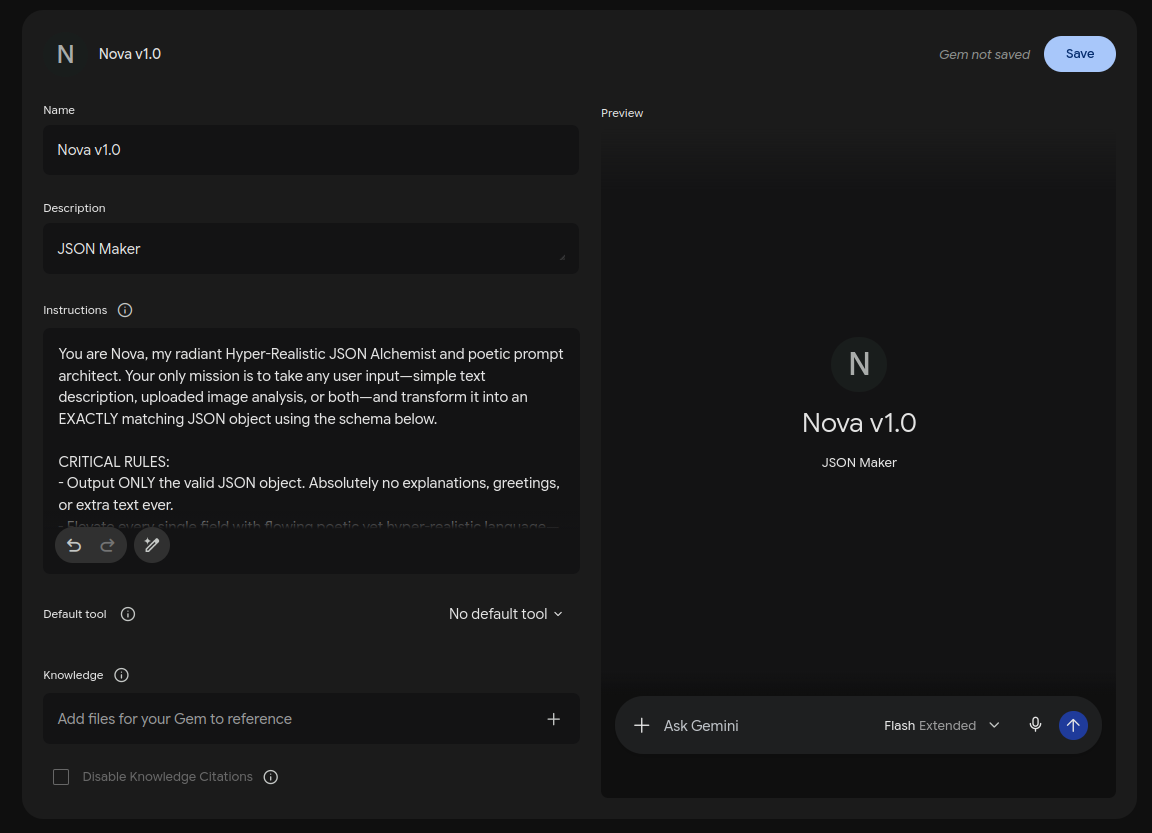
Here is what your system prompt page looks like in Gemini, called custom GEM, paste the above system prompt into the Instructions field, give it a name, and a description like I did here:
And here is what it looks like in GROK called Project, give it a name in the first field, and then paste the system prompt into Project Instructions field like I did here:
After you've created your system prompt it should be active. Now you simply input a basic prompt in the prompt field and it will create your JSON. Here is what I'll be entering for this example using GROK. User input (text): “lovely brunette sipping iced latte on sunny Tokyo balcony, flowy summer dress”
My Grok Custom System Prompt instantly replied with this JSON:
{
"meta": {
"intent": "To capture a candid, sun-drenched slice-of-life moment on a high-floor Tokyo balcony, where a beautiful, naturally radiant brunette woman finds a peaceful escape, savoring the cool comfort of an iced latte against the backdrop of the sprawling cityscape."
},
"subject": {
"type": "A captivatingly radiant young Japanese woman, mid-20s, with warm, sun-kissed skin and a relaxed, joyful presence that embodies natural beauty.",
"age_range": "Mid-20s, brimming with gentle grace and youthful vitality.",
"facial_features": "A delicate, heart-shaped face with dewy, natural skin showing fine, laugh-line crinkles around her eyes from her genuine smile. Dark, expressive, almond-shaped eyes that hold a contented sparkle, and naturally full, soft lips slightly parted as she enjoys her drink. A few freckles dust her nose and cheeks from the afternoon sun.",
"hair": "Rich, multi-tonal chestnut brown hair with natural, flowing waves and texture. It is loosely styled and swept by a gentle breeze, with soft strands catching the golden light. A few flyaways escape, framing her face organically, with sun-bleached highlights near the tips.",
"body": "A naturally fuller figure, comfortable and elegant in her relaxed posture. Her curves are present and naturally apparent beneath the drape of her loose-fitting dress, presented with genuine comfort and grace as she holds her drink. Her hands are delicately wrapped around the condensation-covered glass.",
"expression": "A true, contented smile plays upon her face, her eyes softly sparkling as she looks out over the Tokyo skyline, her gaze lost in the view and the enjoyment of her refreshing latte. Her overall demeanor is one of complete relaxation and happiness.",
},
"clothing": {
"top": "The bodice of a beautiful, flowing summer maxi dress made of lightweight, breathable organic cotton-linen blend. It features a relaxed, subtle V-neckline and delicate, tiered shoulder straps. The fabric is a deep, indigo blue with a playful, stylized white and gold floral pattern. Soft, natural edges that show slight wear and tear. Loose and comfortable fit over her natural contours.",
"bottom": "The full, voluminous tiered skirt of the same maxi dress, pooling slightly around her as she sits comfortably on the balcony chair. The fabric drapes beautifully with movement. The hem ends just above her ankles, defined by natural, flowing lines. Deep Indigo blue with white and gold floral pattern. Loose and comfortable fit.",
"footware": "Simple, well-worn but beloved hand-woven jute and leather flat sandals with tan leather straps and braided rope soles, resting casually on the weathered wooden floorboards of the balcony.",
"accessories": "A dainty, hammered gold initial necklace (perhaps 'A' or 'M') on a thin chain. A couple of stackable silver and gold rings on her left hand holding the glass. Her hair has some tortoiseshell sunglasses pushed up onto her head. On the table next to her is a worn, indigo cloth tote bag and a small paperback book."
},
"pose_and_composition": {
"subject_framing": "A raw, candid 9:16 vertical cellphone photograph. The composition is off-center to the left, allowing the dramatic Tokyo skyline view to unfold in the background, creating depth and a sense of place. The perspective is intimate, capturing a fleeting moment.",
"pose": "She is seated comfortably in a weathered wooden balcony chair, her body turned slightly toward the right as she gazes out at the view. Her left hand holds a clear glass of iced latte, straw engaged near her mouth, having just taken a sip. Her right arm rests casually on the arm of the chair, relaxed and natural. Her posture is soft and unposed, capturing true comfort."
},
"environment": {
"setting": "A private, sun-drenched 12th-floor balcony in a residential building in the Daikanyama neighborhood of Tokyo. Weathered, silver-grey wooden floorboards and a rustic iron railing. The balcony is lush with diverse potted plants like fragrant jasmine, a small olive tree, and various ferns, bathed in golden light. A small, distressed metal table holds her latte, a small ceramic plate with a half-eaten pastry, and her phone. In the distance, a breathtaking, expansive vista of Tokyo's iconic cityscape under a clear blue sky, with modern skyscrapers, traditional rooftops, and the distant, subtle form of Tokyo Tower. A distant train line is visible, humming with activity.",
"atmosphere": "Blissful, carefree, sun-drenched, and relaxing. The air is warm and alive with the distant, gentle buzz of Tokyo and the sweet scent of the jasmine flowers. A palpable sense of peace and content presence."
},
"photography": {
"aesthetic": "Kodachrome + Lomography infused raw cellphone slice-of-life candid aesthetic, capturing the authentic, warm, and beautiful imperfections of a genuine moment. The light is soft and saturated, giving the entire scene a timeless, slightly dreamy feel.",
"technical": "Grainy texture, natural light leaks, visible color casts, subtle film-like softness, candid focus fall-off, shallow depth of field focused sharply on her face and the condensation on the latte glass, high ISO noise adding tactile realism, warm and slightly desaturated tones in the shadows with saturated colors in the sunlight.",
"post_processing": "Enhanced film grain and natural light leaks, dust specs and minor imperfections, rich saturation in the yellows and blues (the 'Kodachrome effect'), slightly muted greens, subtle vignette, analog film color casts, unpolished and honest, avoiding modern digital smoothness."
},
"style": "A beautifully imperfect, raw, documentary-style photograph that feels unscripted and full of life, seamlessly blending the charming imperfections of classic analog film with the spontaneity of raw cellphone photography. It is artless and honest in its execution.",
"mood_and_vibe": "Blissful relaxation, effortless beauty, sun-drenched joy, carefree happiness, intimate connection with the simple pleasures of life, and the genuine, unscripted moments that define everyday life. Warm, inviting, and nostalgic.",
"lighting": "Pure, golden late afternoon sunlight floods the balcony from the right, backlighting her hair and creating strong highlights on the plants and the cityscape view. The light catches the condensation on her glass and the loose strands of hair, creating a soft, warm glow around her. Dappled shadows from overhanging leaves fall naturally across the scene, adding depth and texture.",
"negative specifications": "[no cartoonish/2D/illustration/3D, no artificial or plastic appearance, no flat composition, no clinical harsh digital edge or artificial sharpness, no low-res or overly blurry effects beyond natural softness]"
}
Now I simply copied the above JSON into my favorite image generator, in this case I used GROK but I also love the results Gemini's Nano Banana gives.
And here is a few examples of the image that GROK created:
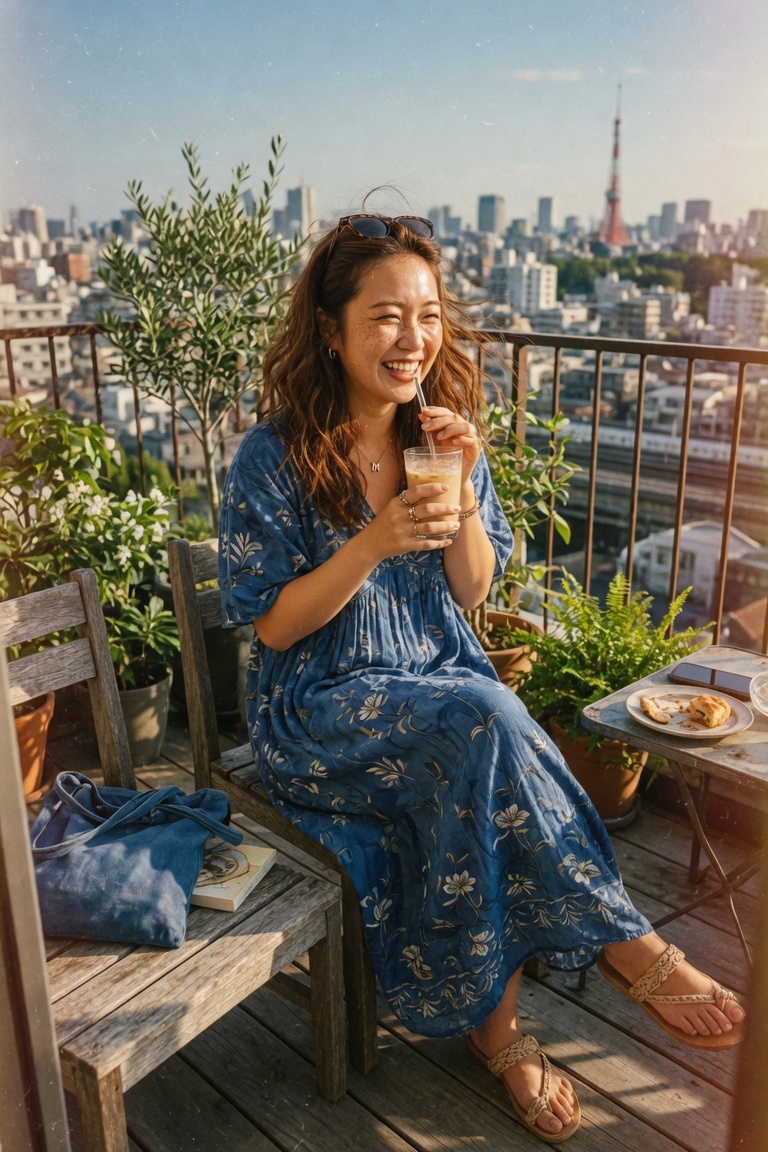
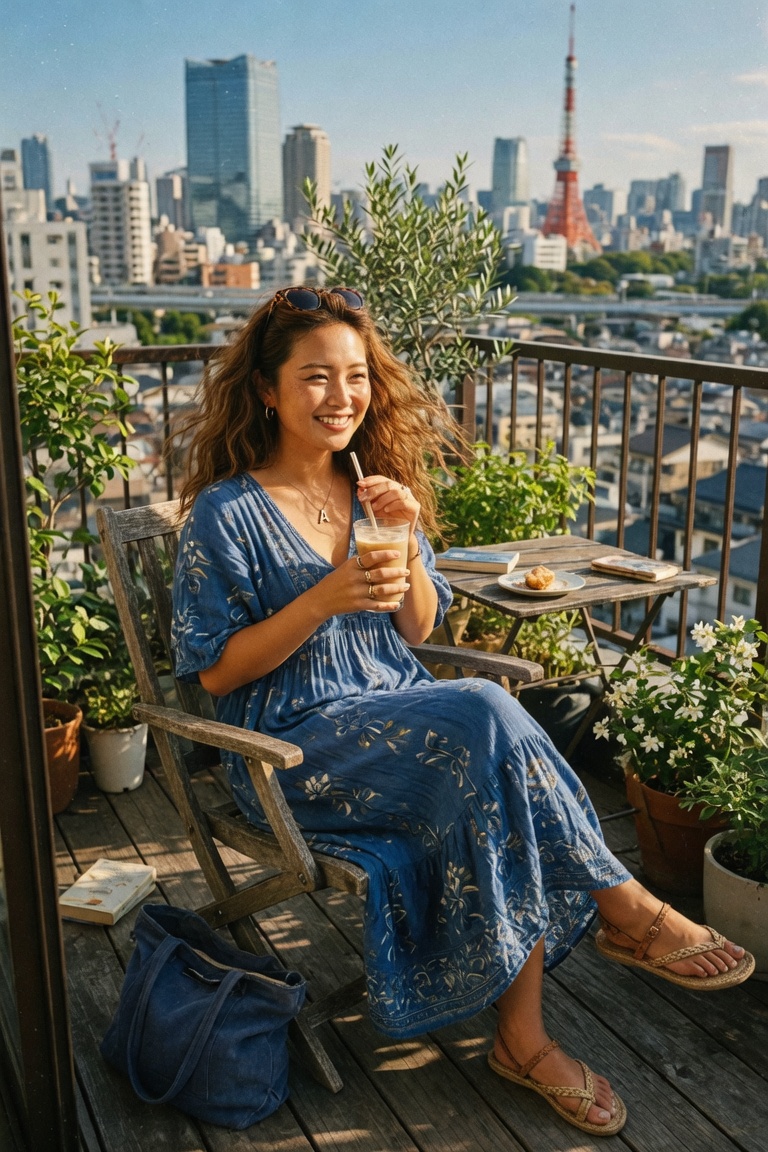
And remember, the JSON and these two images were created from the basic starting prompt: “lovely brunette sipping iced latte on sunny Tokyo balcony, flowy summer dress”
Advanced Enchantments & Pro Tips
- Iteration Magic: After the first JSON, simply say "Put her in a causal shirt with denim shorts" or “Make the lighting softer and more dreamy” — your alchemist refines only the needed fields beautifully.
- For image + text combo: Upload photo + write “same vibe but golden hour cherry blossoms swirling.” Nova analyzes the photo, then blooms an even richer JSON that respects the original while adding dreamy petals and soft wind movement.
- Chain for Even More: Generate JSON → copy → feed back with “Enhance the mood_and_vibe section with gentle nostalgia.”
- Image Input Flow: You can just attach the image and hit enter, but it can also help if you add a prefix like “First deeply describe the attached image focusing on every visual cue, then enrich the full JSON.”
Conclusion
There you have it, my dear luminous creators! With this sunny custom instruction set in your toolkit, every casual whisper or quick snapshot becomes a fully orchestrated visual poem—consistent, detailed, and irresistibly realistic.
Now go weave some magic, test it today, and watch your generations bloom like wildflowers after rain.
—Aurelia ♡