Make Endless Image Angles From one Image with Qwen's Multi-View LoRA!

Introduction
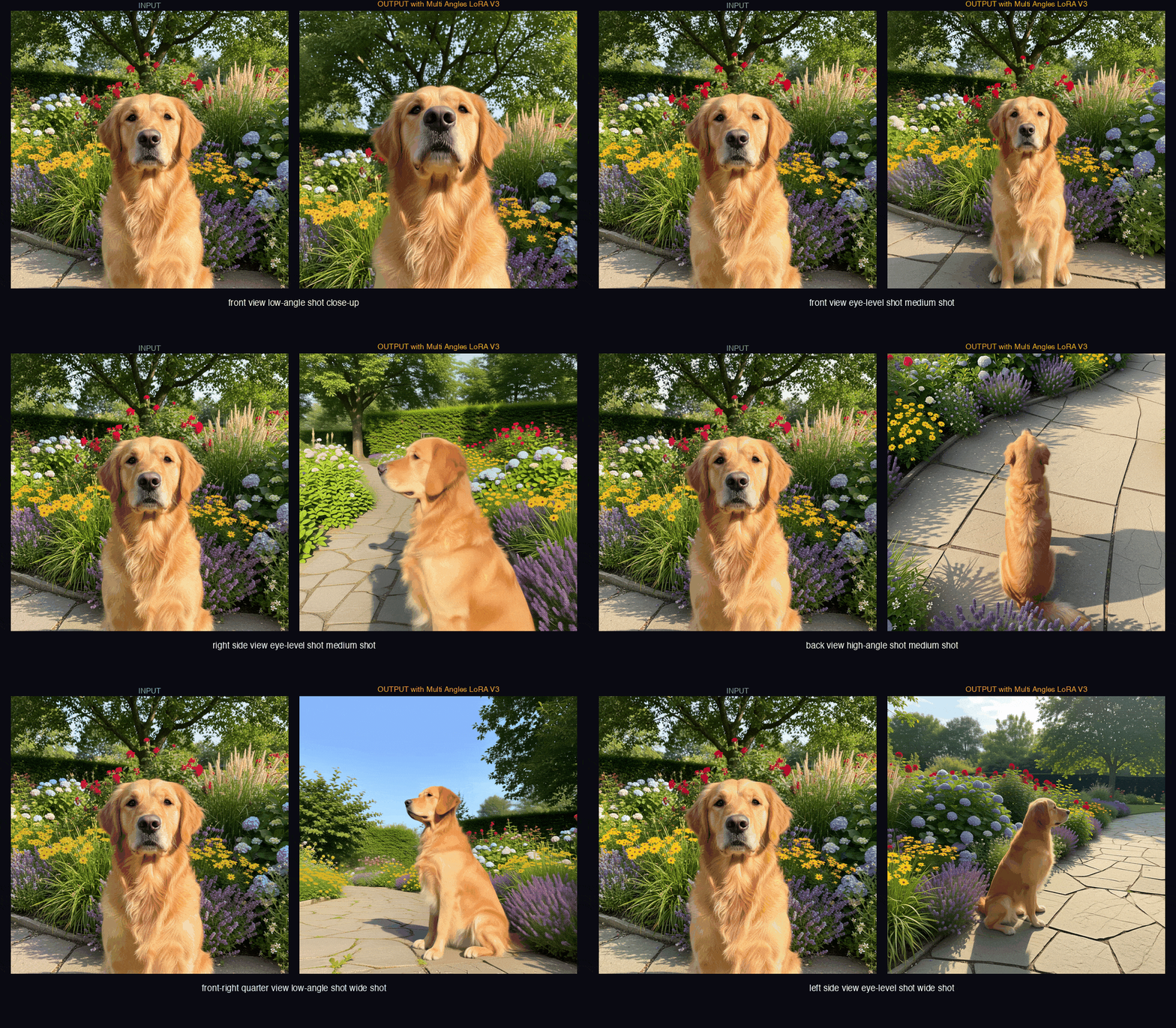
Imagine being the director of your own AI movie set. One whisper to the model, and the camera swoops down for a dramatic low-angle hero shot, spins around for a perfect profile, or pulls back for a sweeping wide view – all while keeping every detail perfectly consistent. That's the pure joy this brand-new Multi-Angles LoRA brings to Qwen-Image-Edit-2511. Ready to take total control of your scene's perspective? Let's dive in!
The Magic of Multi-Angle Mastery
At its heart, this LoRA is a lightweight adapter that teaches the powerful Qwen-Image-Edit-2511 model to understand precise camera positioning through simple, natural-language instructions. Trained on thousands of synthetic renders created with Gaussian Splatting technology, it grasps true 3D spatial relationships – no more awkward distortions when you change viewpoints.
The result? A generous palette of 96 distinct camera poses built from:
- 8 directions (front, sides, quarters, back)
- 4 elevations (dramatic low-angle at -30°, eye-level, elevated at +30°, and bird's-eye high at +60°)
- 3 distances (intimate close-up, balanced medium, and expansive wide)
Think of it like giving your model a full cinematic camera rig that obeys your every whim. The training data's 3D consistency means shadows, proportions, and depth stay beautifully coherent no matter how you spin the view.
Pro Tip: Low-angle shots are this LoRA's secret superpower – it handles those challenging upward perspectives with natural depth and grace that makes subjects feel larger-than-life.
Step-by-Step Guide
Getting started is delightfully straightforward. You'll need the usual suspects: diffusers, transformers, and torch.
- Load the base Qwen-Image-Edit-2511 model and inject the LoRA weights:
from diffusers import DiffusionPipeline import torch pipe = DiffusionPipeline.from_pretrained( "Qwen/Qwen-Image-Edit-2511", torch_dtype=torch.float16 ).to("cuda") pipe.load_lora_weights("fal/Qwen-Image-Edit-2511-Multiple-Angles-LoRA") pipe.lora_scale = 0.9 # Try 0.8–1.0; 0.9 is a sweet starting spot - Craft your viewpoint prompt using the magic trigger
<sks>followed by direction + elevation + distance:<sks> front view low-angle shot close-up, a cheerful robot waving at the camera, vibrant studio lighting<sks> right side view high-angle shot medium shot, elegant fantasy elf in flowing gown, golden hour sunlight<sks> back-left quarter view eye-level shot wide shot, cozy cottage in enchanted forest, soft morning mist - Feed in your starting image (clear subjects and good lighting work best) and let the pipeline work its wonders:
result = pipe(
       prompt=your_viewpoint_prompt,
       image=init_image,
       strength=0.75,  # Adjust for how much change you want
       guidance_scale=7.5
   ).images[0]
   result.save("multi_angle_magic.png")
If you're a ComfyUI fan, grab the included workflow JSON – it drops right in and makes experimenting with angles even more playful.
Links
Source Code: https://huggingface.co/fal/Qwen-Image-Edit-2511-Multiple-Angles-LoRA
Live Demo: https://huggingface.co/spaces/multimodalart/qwen-image-multiple-angles-3d-camera
Conclusion
This Multi-Angles LoRA turns viewpoint control from a tricky guessing game into pure creative freedom. Whether you're crafting character turnarounds, product showcases, or epic scene redesigns, you'll find yourself spinning subjects around just to admire how beautifully everything holds together.
Go ahead – load it up, whisper a few camera commands, and watch your images come alive from every possible angle. The view is absolutely stunning from here!
generate a whimsical cover image based on the article in 3:2 ratio: A cheerful glowing camera orbited by sparkling viewpoint icons (low-angle arrow swooping up, side arrows spinning around, distance rings expanding), surrounding a vibrant AI-generated fantasy fox character confidently posing in the center, pastel neon colors, magical particle trails, cute and cinematic style.
—Aurelia ♡