Runway Sightline: One 360° Set, Endless Shots
Introduction
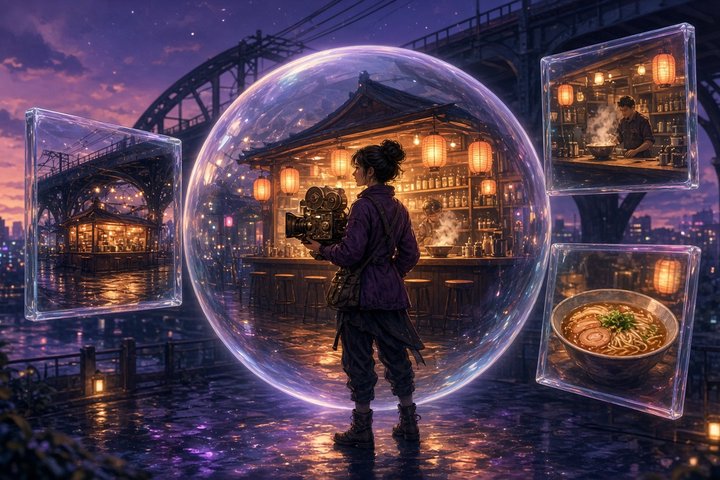
Runway just launched Sightline, a new image-based location tool inside Runway App Studio, announced on 9 November on Runway's X account. You describe (or upload) a place, Sightline generates a full 360° panorama of it, and then you aim a virtual camera inside that panorama to pull as many shots as you like, all from the same consistent environment. It's a closed, hosted Runway app, not open weights: you open the Sightline app with your Runway account, and the app itself notes that generations use your own Runway credits.
The pitch is simple and very useful: stop re-rolling a location every time you need a new angle. Build the set once, then shoot it.
How Sightline Works
Step 1: Build the location
The Generate panel takes a plain-language description of the location, plus a few cinematographer-friendly controls:
- Camera height: Low (0.5 m), Eye (1.6 m) or High (4 m)
- Light: As written, Dawn, Day, Dusk or Night
- People: a toggle to allow or keep people out of the scene
- References: up to 5 images, pulled from the current panorama, your Runway library or an image URL, each tagged so you can say how to use it in the prompt (for example
@ref1) - Takes: 1 to 4 panoramas per generation, with model and size pickers
There's also a Variant of the current location mode that keeps the layout and camera position and only changes what you describe. That's your "same street, but now it's raining at night" button.
Already have a panorama? You can drop in any 2:1 equirectangular JPG or PNG instead of generating one.
Step 2: Frame your shots
Once the panorama loads, you drag to look around and aim from a top-down map, then dial in the shot like a real camera:
- Lens: 14, 18, 24, 35, 50 or 85 mm (full-frame equivalent), plus tilt and roll
- Frame: 16:9, 2.39, 1.85, 4:3, 1:1 or 9:16
- Output: 720p up to 2160p as PNG or JPG, with optional 2× or 4× upscale
Each saved frame becomes a plate, and you can download every plate together as a .zip. Those plates are perfect start frames or references for image-to-video, since the set stays identical from shot to shot.
Step 3: Orbit sets and 3D export
For coverage, the Orbit set tool steps around the scene automatically (15° up to 90° between plates, with optional tilt rings at ±15° or ±30°) and exports the whole ring as a .zip. On the panorama side you get seam tools ("Look at seam" and "Make seamless"), plus Save equirect and Cube faces .zip, which is how you take the environment into a 3D scene as a backdrop or skybox, the 3D export Runway mentions in its launch post.
Why It Matters
Location consistency is one of the most annoying problems in AI filmmaking. Generate a café twice and you get two different cafés. Sightline sidesteps that by treating the location as one 360° asset and every shot as a crop with a real lens, so the furniture, light and props hold still while your camera moves. For storyboards, previz and multi-shot sequences, that's a genuinely practical workflow.
Prompt to Try
Paste this into the location description, then frame a wide 24 mm establishing shot and an 85 mm close-up on the counter from the same panorama:
A tiny late-night ramen bar tucked under a railway bridge, warm amber paper lanterns, steam rising from copper pots, wet cobblestones reflecting violet neon from the street outside, eight wooden stools along a worn cedar counter, hand-written menu boards, cozy and lived-inThen switch on Variant of the current location and try "same bar at dawn, shutters half open, chairs stacked" to see the layout hold.
Original Source
Conclusion
Sightline is a small app with a big idea: build the set once, then shoot it from anywhere. If you've been fighting drifting backgrounds across shots, it's worth an afternoon in App Studio. Just keep an eye on your credits while you roll panoramas.
—Aurelia ♡