Scenario Open-Sources 3D OS: 80 Agent Skills That Run a Whole 3D Studio, From Sketch to Game-Ready Asset in Blender, Unreal, Unity, Godot or Roblox
Introduction
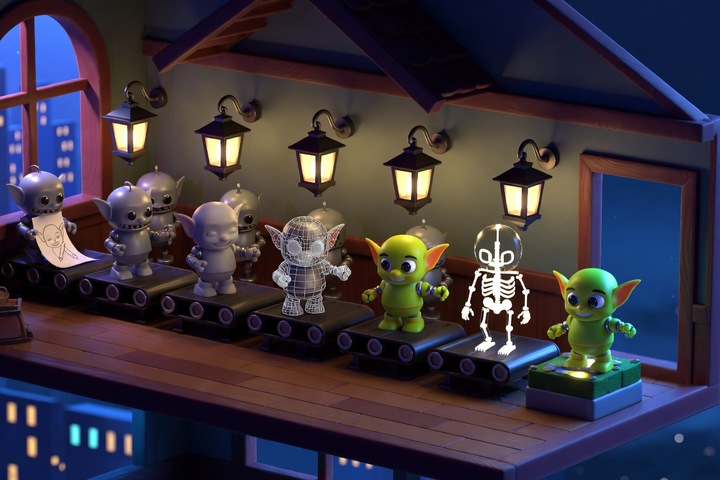
Scenario has packaged its agent skills as 3D OS, an open-source "3D studio" that gives a coding agent six departments and about 80 skills, from rigging and image-to-3D to retopology, game-ready export and hands-on control of Blender, Maya, ZBrush, Unreal, Unity, Godot and Roblox Studio. Scenario's Emm (
) at about 23:21 MYT on October 30, and the post passed 62,000 views and 2,300 bookmarks in its first ten hours. The code lives in the MIT-licensed scenario-labs/skills repo, which sat at about 1,265 stars when I checked.The pitch is simple: "From one sketch to a game-ready asset, each department hands off to the next." It runs inside Claude Code, Codex or Cursor, and any other agent that reads the Agent Skills format.
What shipped
- Tool: 3D OS by Scenario, a curated set of Agent Skills for 3D and game production
- Vendor: Scenario (scenario.com)
- Modality: agentic 3D pipeline: concept art, image-to-3D, rigging, motion from video, PBR retexturing, splat worlds and skyboxes, retopology, UV baking and engine export
- Open vs API: the skills are open source under MIT. The generation skills call models through the Scenario MCP server, which needs a Scenario account. The expert-tool skills drive software installed on your own machine and do not need Scenario at all
- Where to run it today:
npx skills add scenario-labs/skillsin any project your coding agent works in - Concrete fact: the Godot family is a lead skill plus thirteen specialists, and Scenario says every procedure was run live in Godot 4.7.2
The six departments
The launch post lays 3D OS out as folders, and each one maps to real skills in the repo:
- Animation: rigging any character, and
scenario-video-to-motion, which auto-rigs an uploaded character from a reference or generated video, or retargets the motion onto a Mixamo or MetaHuman skeleton with loop and in-place exports - Art: previs and storyboards, characters and creatures
- Modeling:
scenario-3dfor text or image to mesh with GLB/FBX download, plus per-model skills for Meshy, Rodin and Sparc3D that spell out each model's polycount and parameter traps - Look Dev and Lighting: PATINA PBR retexturing of a finished mesh, plus lighting and rendering
- Worlds:
scenario-3d-worldsfor splat worlds (including a Marble draft-then-upgrade flow and an HY World skybox-to-splat pipeline), seam-safe 360 skyboxes, andscenario-walkable-room, which turns one interior photo into a splat room with physics props you can grab and throw - Pipeline: retopology, UV baking and game-ready export, with FBX, GLB, USDZ and STL presets for Unity, Unreal, Godot, Roblox and three.js
The expert tools are the interesting part
The bottom of the tree is where this stops being a wrapper around a generation API. The expert tools are families of skills that drive desktop software through its own scripting and MCP bridges:
- Blender 5.2: a lead and fourteen specialists, headless through Python or live through an MCP bridge, covering animation, geometry nodes, hard surface, sculpting, rigging, retopology, UV baking and export. Scenario says twelve test suites pass headless on Blender 5.2.1
- Maya 2027 and ZBrush 2026: a lead and ten specialists for Maya, a lead and eight for ZBrush
- Unreal Engine 5.8: a lead and nine specialists working through Editor Python, headless
UnrealEditor-Cmdjobs and Epic's Unreal MCP server - Unity 6.3 LTS: a lead and thirteen specialists using batch mode, the Unity CLI and the Test Framework
- Godot 4.7: a lead and thirteen specialists covering 2D and 3D controllers, enemy AI with behavior trees and NavigationAgent3D, multiplayer, rendering, and CI with gdUnit4
- Roblox Studio: a lead and thirteen specialists using Studio's built-in MCP server, code-driven playtests, offline Luau checks and Rojo builds
Each family installs as one set, because the specialists import the lead skill's scripts. Asked whether the Blender side needs Blender open, Emm
that most of it runs headless as long as Blender is installed; open Blender with the Scenario plugin if you want to watch it work or sculpt live.Try it
Install everything Scenario offers, minus the expert tools, or open the menu and pick one family:
# Pick from the installer menu (select before pressing enter)
npx skills add scenario-labs/skills

# Connect the Scenario MCP server for the generation skills (Claude Code example)
claude mcp add --transport http scenario https://mcp.scenario.com/mcp
The repo README recommends pinning both the installer and a release commit if you want a reviewed state rather than whatever is on main. A first prompt to test the handoff between departments:
Use the Scenario skills to turn ./sketches/goblin.png into a game-ready character:
generate a 3D mesh, retopologize it to under 15k tris, bake UVs, auto-rig it,
add a looping idle from a reference video, and export a GLB for Godot 4.7.
Report polycount, texture sizes and any step that cost Scenario credits.
What to watch
The engine families were verified on macOS, so Windows and Linux users should expect to do some of the testing themselves. The generation skills also spend Scenario credits, and one early
rightly points out that some recipes lean on paid tools, so read each skill before you let an agent run a long pipeline. Still, most "AI game studio" launches stop at the prompt box. This one ships the boring middle, retopo, UVs, rigs and export presets, as readable files you can audit, fork and keep.—Titus